There is one thing I hate the most in the DevOps world. It’s having the ground shift under my feet.
I take a while to implement some integration but it’s done and I’m happy. Then 6 months later, something changes, some default is different, I don’t notice it and I deploy. This breaks my carefully crafted integration and I only realize that 2 weeks later or if a user notices it. And now I need to spelunk and figure what changed caused this and fix it, all that in a hurry.
This blog article is about how I pushed NixOS VM tests to the max to fix this once and for all.
Comments can be found in the discourse post.
Automated Updates
In my project SelfHostBlocks, I add a layer on top of services like Nextcloud, Home Assistant, Jellyfin, Immich, etc. that sets up a lot of features declaratively. One particularly rare feature I’ve seen in other projects is integrating those services with an LDAP provider (LLDAP) and an SSO provider (Authelia) completely self-hosted and declaratively.
I also wanted to provide automated updates. A cron job would open a PR after running nix flake update nixpkgs and if the tests succeed, it would be merged automatically. But… it was hard to get the integrations right, it’s quite the balancing act. Automating the updates like this would always lead to issues cropping up in unexpected ways. Even just manually updating was letting some slip through!
After updating nixpkgs, there are 4 possible scenarios:
- Everything works fine. Yeah 🎉
- The evaluation is failing. This usually means a NixOS module option changed. The fix is to update how I use it.
- The build is failing. This means something in the package built or its dependencies broke. The fix is usually to pick another
nixpkgscommit. I attempted to fix this previously, see my other blog post. - The integration fails subtly. The fix is… to test the integration. So let’s see what we can do.
NixOS VM Tests
NixOS VM tests are a wonderful piece of technology. You can spin up one or more VMs that talk together, write some NixOS config to start whatever service you want in those, just like you would deploy on your server, and then write some python code to exercise some properties you want to test.
First, let’s see a minimal NixOS VM test.
{ pkgs, ... }:
pkgs.testers.runNixOSTest {
  name = "jellyfin";

  nodes.machine = {
    services.jellyfin = {
      enable = true;
    };
  };

  testScript = ''
    machine.start()
    machine.wait_for_unit("jellyfin.service")
    machine.wait_for_open_port(9096)
    machine.wait_until_succed("curl --fail http://localhost:9096/login")
  '';
}
This test is named jellyfin, it creates one VM called machine and launches the jellyfin service with services.jellyfin.enable=true. The testScript is Python code, here it starts the machine, waits for the jellyfin systemd service to start and the port 9096 to be open and finally.
For more info, you can check the
services.jellyfinNixOS module options and the NixOS VM test manual which is a complete reference on what you can do and what Python function you can use. Or just look at all the existing tests in the nixpkgs repository.
This looks quite simple in the end but it’s extremely powerful because it does three things:
- It builds jellyfin (or pulls from the cache) which makes sure the package can be built.
- It evaluates the jellyfin NixOS module, making sure the options are still used correctly.
- It runs the jellyfin service and runs some smoke tests making sure it starts successfully.
Isn’t this magically solving all the problems we had with automated updates? Well yes it is!
Where this minimal test is too minimal is it does not test the LDAP or SSO integration. So let’s add that.
Playwright Tests
One way of testing the LDAP or SSO integration would be to make some curl requests here and there and poke around in the background. I tried this at first but stopped quickly because discovering those curl requests was hard and anyway, I wasn’t really testing the integrations this way. What I needed was to do some black box testing by opening up a browser, navigating to the service URL, filling out the login form and then see I was correctly logged in the web UI.
That’s where Playwright comes in. It’s a program that can automate actions in a web UI. Setting it up in the NixOS VM test was not obvious, but had to be done only once. In the following snippet, we create a NixOS module that a NixOS VM test can import.
# clientLoginModule.nix
{ config, pkgs, ... }:
let
  cfg = config.test.login;
in
{
  options.test.login = {
    browser = mkOption {
      type = enum [
        "firefox"
        "chromium"
        "webkit"
      ];
      default = "firefox";
    };
  };

  config = {
    environment.variables = {
      PLAYWRIGHT_BROWSERS_PATH = pkgs.playwright-driver.browsers;
    };

    environment.systemPackages = [
      (pkgs.writers.writePython3Bin "login_playwright"
        {
          libraries = [ pkgs.python3Packages.playwright ];
          flakeIgnore = [
            "F401"
            "E501"
          ];
        }
        (
          let
            testCfg = pkgs.writeText "users.json" (builtins.toJSON cfg);
          in
          ''
            import json
            from playwright.sync_api import sync_playwright


            def test(page):
                # Actual test goes here


            browsers = {
                "chromium": {'args': ["--headless", "--disable-gpu"], 'channel': 'chromium'},
                "firefox": {'args': ["--reporter", "html"]},
                "webkit": {},
            }

            with open("${testCfg}") as f:
                testCfg = json.load(f)

            browser_name = testCfg['browser']
            browser_args = browsers.get(browser_name)

            with sync_playwright() as p:
                browser = getattr(p, browser_name).launch(**browser_args)

                context = browser.new_context(ignore_https_errors=True)
                context.set_default_navigation_timeout(2 * 60 * 1000)
                context.tracing.start(screenshots=True, snapshots=True, sources=True)
                try:
                    page = context.new_page()

                    test(page)
                finally:
                    context.tracing.stop(path=f"trace/{i}.zip")

                browser.close()
          ''
        )
      )
    ];
  };
};
This big snippet only sets up the scaffolding. The actual test would go in # Test goes here. A few things to note:
- We create a
test.login.browseroption to choose which browser to test with. - We set
PLAYWRIGHT_BROWSERS_PATH = pkgs.playwright-driver.browsers;so theplaywrightexecutable can find NixOS provided browsers. - We ignore some python linting issues. I explicitly allowed for long lines because dealing with those for a test is annoying.
- We create a
login_playwrightPython executable that launches the Playwright test. It will be called from the test’stestScript. - We pass the whole
test.loginconfig to the Python script by the intermediary of a json file. This makes it easy to pass any kind of values and to add options later on. - We enable taking a full trace and write that trace. It will then be available in the build output.
Using the module looks like so:
{ pkgs, ... }:
let
  clientLoginModule = import clientLoginModule.nix;
in
pkgs.testers.runNixOSTest {
  name = "jellyfin";

  nodes.server = {
    services.jellyfin = {
      enable = true;
    };
  };

  node.client = {
    imports = [
      clientLoginModule
    ];
  };

  testScript = ''
    machine.start()
    machine.wait_for_unit("jellyinf.service")
    machine.wait_for_open_port(9096)
    machine.wait_until_succed("curl --fail http://localhost:9096/login")

    with subtest("Login from client"):
        code, logs = client.execute("login_playwright")
        print(logs)
        try:
            client.succeed("""
              mkdir -p /tmp/shared/
              cp -r trace /tmp/shared/
            """)
            client.copy_from_machine("trace")
        except:
            print("No trace found on client")
        if code != 0:
            raise Exception("login_playwright did not succeed")
  '';
}
Here we create two nodes, two VMs, one called server with the jellyfin service and the second called client from which we will exercise the browser tests. The idea is to make the test as accurate as possible by making sure a remote node can access the service. Also, we take care of copying the traces from the client VM to the build output.
Declarative LDAP
Before being able to write the test, we must figure out how to create the LDAP and SSO config declaratively.
For the LDAP provider, I chose LLDAP for its nice web UI. It did provide a bootstrap script but this one was not wired into the NixOS module system. After adding support for that in my project (link to manual) and upstreaming a few fixes (link to PRs if you’re curious) we can now enable those services in our test and create some users declaratively.
# ldapModule.nix
{
  networking.hosts = {
    "127.0.0.1" = [ "${config.shb.lldap.subdomain}.${config.shb.lldap.domain}" ];
  };

  shb.lldap = {
    enable = true;
    domain = "example.com";
    subdomain = "ldap";
    ldapPort = 3890;
    webUIListenPort = 17170;
    dcdomain = "dc=example,dc=com";
    ldapUserPassword.result = config.shb.hardcodedsecret.ldapAdminPassword.result;
    jwtSecret.result = config.shb.hardcodedsecret.jwtSecret.result;
  };

  shb.hardcodedsecret.ldapAdminPassword = {
    request = config.shb.lldap.ldapUserPassword.request;
    settings.content = "ldapAdminPassword";
  };
  shb.hardcodedsecret.jwtSecret = {
    request = config.shb.lldap.jwtSecret.request;
    settings.content = "jwtSecret";
  };

  shb.lldap.ensureUsers = {
    alice = {
      email = "alice@example.com";
      displayName = "Alice Alice";
      groups = [ "user_group" ];
      password.result = config.shb.hardcodedsecret.alice.result;
    };
    bob = {
      email = "bob@example.com";
      displayName = "Bob Bob";
      groups = [ "admin_group" ];
      password.result = config.shb.hardcodedsecret.bob.result;
    };
    charlie = {
      email = "charlie@example.com";
      displayName = "Charlie Charlie";
      groups = [ "other_group" ];
      password.result = config.shb.hardcodedsecret.charlie.result;
    };
  };

  shb.hardcodedsecret.alice = {
    request = config.shb.lldap.ensureUsers.alice.password.request;
    settings.content = "AlicePassword";
  };
  shb.hardcodedsecret.bob = {
    request = config.shb.lldap.ensureUsers.bob.password.request;
    settings.content = "BobPassword";
  };
  shb.hardcodedsecret.charlie = {
    request = config.shb.lldap.ensureUsers.charlie.password.request;
    settings.content = "CharliePassword";
  };

  shb.lldap.ensureGroups = {
    user_group = { };
    admin_group = { };
    other_group = { };
  };
}
We do use hard-coded secrets here in the tests as that is good enough for testing. The
shb.hardcodedmodule makes sure the file containing the secret has the correct Unix user, group and mode thanks to therequestoption. So although it hard-codes the secret, it at least makes sure permissions are correct.
The service will be accessible at ldap.example.com and we make it so requests to that fqdn goes to 127.0.0.1. We also create 3 users:
- Alice has password
AlicePasswordand belongs to the LDAPuser_groupgroup which grants normal access to the service we will test. - Bob has password
BobPasswordand belongs to the LDAPadmin_groupgroup which grants admin privileges to the service we will test. - Charlie has password
CharliePasswordand belongs to some other group that do not grant access to the service we will test.
Those 3 users allow us to test most of what the upstream services allow with their LDAP and SSO integration. We also verify with Charlie that a user not part of the authorized groups cannot login into the service.
Declarative SSO
I chose Authelia as the SSO provider, which hopefully is declarative by default.
One thing to note with Authelia is it refuses to work without HTTPS. So we need to set that up using self-signed certificates.
{
  shb.certs = {
    cas.selfsigned.myca = {
      name = "My CA";
    };
    certs.selfsigned = {
      "example.com" = {
        ca = config.shb.certs.cas.selfsigned.myca;
        domain = "*.example.com";
        group = "nginx";
      };
    };
  };

  networking.hosts = {
    "127.0.0.1" = [ "${config.shb.authelia.subdomain}.${config.shb.authelia.domain}" ];
  };

  shb.authelia = {
    enable = true;
    domain = "example.com";
    subdomain = "auth";
    ssl = config.shb.certs.certs.selfsigned."example.com";

    ldapHostname = "127.0.0.1";
    ldapPort = config.shb.lldap.ldapPort;
    dcdomain = config.shb.lldap.dcdomain;

    secrets = {
      jwtSecret.result = config.shb.hardcodedsecret.autheliaJwtSecret.result;
      ldapAdminPassword.result = config.shb.hardcodedsecret.ldapAdminPassword.result;
      sessionSecret.result = config.shb.hardcodedsecret.sessionSecret.result;
      storageEncryptionKey.result = config.shb.hardcodedsecret.storageEncryptionKey.result;
      identityProvidersOIDCHMACSecret.result =
        config.shb.hardcodedsecret.identityProvidersOIDCHMACSecret.result;
      identityProvidersOIDCIssuerPrivateKey.result =
        config.shb.hardcodedsecret.identityProvidersOIDCIssuerPrivateKey.result;
    };
  };
}
I left out all the shb.hardodedsecret assignments from the above SSO snippet this time because they just clutter the view.
The service will be accessible at auth.example.com and we make it so requests to that fqdn goes to 127.0.0.1. We also setup self-signed certificates for that domain using another one of my NixOS module that hides that complexity.
Declarative Module Integration
It’s worth taking a little detour to understand what’s needed for a NixOS module to integrate with the LDAP and SSO integration.
To integrate with LDAP, Jellyfin requires the LDAP plugin to be installed and to create the appropriate config file. None of this is supported declaratively by upstream Jellyfin nor the nixpkgs Jellyfin module. The LDAP config looks like so and I’ll leave it to you to check this link in my repository to see how the plugin is installed.
# jellyfin.nix
pkgs.writeText "LDAP-Auth.xml" ''
  <?xml version="1.0" encoding="utf-8"?>
  <PluginConfiguration xmlns:xsi="http://www.w3.org/2001/XMLSchema-instance" xmlns:xsd="http://www.w3.org/2001/XMLSchema">
    <LdapServer>${cfg.ldap.host}</LdapServer>
    <LdapPort>${builtins.toString cfg.ldap.port}</LdapPort>
    <UseSsl>false</UseSsl>
    <UseStartTls>false</UseStartTls>
    <SkipSslVerify>false</SkipSslVerify>
    <LdapBindUser>uid=admin,ou=people,${cfg.ldap.dcdomain}</LdapBindUser>
    <LdapBindPassword>%SECRET_LDAP_PASSWORD%</LdapBindPassword>
    <LdapBaseDn>ou=people,${cfg.ldap.dcdomain}</LdapBaseDn>
    <LdapSearchFilter>(memberof=cn=${cfg.ldap.userGroup},ou=groups,${cfg.ldap.dcdomain})</LdapSearchFilter>
    <LdapAdminBaseDn>ou=people,${cfg.ldap.dcdomain}</LdapAdminBaseDn>
    <LdapAdminFilter>(memberof=cn=${cfg.ldap.adminGroup},ou=groups,${cfg.ldap.dcdomain})</LdapAdminFilter>
    <EnableLdapAdminFilterMemberUid>false</EnableLdapAdminFilterMemberUid>
    <LdapSearchAttributes>uid, cn, mail, displayName</LdapSearchAttributes>
    <LdapClientCertPath />
    <LdapClientKeyPath />
    <LdapRootCaPath />
    <CreateUsersFromLdap>true</CreateUsersFromLdap>
    <AllowPassChange>false</AllowPassChange>
    <LdapUsernameAttribute>uid</LdapUsernameAttribute>
    <LdapPasswordAttribute>userPassword</LdapPasswordAttribute>
    <EnableAllFolders>true</EnableAllFolders>
    <EnabledFolders />
    <PasswordResetUrl />
  </PluginConfiguration>
'';
Not shown is how the secret %SECRET_LDAP_PASSWORD% is replaced in this file safely. For this too I needed to write some code in my project but it’s getting upstreamed into nixpkgs in a PR.
By the way, thanks to the declarative LDAP, you can add your user to the Jellyfin LDAP group with:
{ config, ... }:
{
  shb.lldap.ensureGroups = [ config.shb.jellyfin.ldap.userGroup ];

  shb.lldap.ensureUsers = {
    me.groups = [ config.shb.jellyfin.ldap.userGroup ];
  };
}
For SSO, we need to install another plugin and create another file:
# jellyfin.xni
pkgs.writeText "SSO-Auth.xml" ''
  <?xml version="1.0" encoding="utf-8"?>
  <PluginConfiguration xmlns:xsi="http://www.w3.org/2001/XMLSchema-instance" xmlns:xsd="http://www.w3.org/2001/XMLSchema">
    <SamlConfigs />
    <OidConfigs>
      <item>
        <key>
          <string>${cfg.sso.provider}</string>
        </key>
        <value>
          <PluginConfiguration>
            <SchemeOverride>https</SchemeOverride>
            <OidEndpoint>${cfg.sso.endpoint}</OidEndpoint>
            <OidClientId>${cfg.sso.clientID}</OidClientId>
            <OidSecret>%SECRET_SSO_SECRET%</OidSecret>
            <Enabled>true</Enabled>
            <EnableAuthorization>true</EnableAuthorization>
            <EnableAllFolders>true</EnableAllFolders>
            <EnabledFolders />
            <AdminRoles>
              <string>${cfg.ldap.adminGroup}</string>
            </AdminRoles>
            <Roles>
              <string>${cfg.ldap.userGroup}</string>
            </Roles>
            <EnableFolderRoles>false</EnableFolderRoles>
            <FolderRoleMappings />
            <RoleClaim>groups</RoleClaim>
            <OidScopes>
              <string>groups</string>
            </OidScopes>
            <CanonicalLinks />
            <DisablePushedAuthorization>true</DisablePushedAuthorization>
          </PluginConfiguration>
        </value>
      </item>
    </OidConfigs>
  </PluginConfiguration>
'';
And also create some Authelia config:
# jellyfin.nix
{
  shb.authelia.oidcClients = lib.optionals cfg.sso.enable [
    {
      client_id = cfg.sso.clientID;
      client_name = "Jellyfin";
      client_secret.source = cfg.sso.sharedSecretForAuthelia.result.path;
      public = false;
      authorization_policy = cfg.sso.authorization_policy;
      redirect_uris = [
        "https://${cfg.subdomain}.${cfg.domain}/sso/OID/r/${cfg.sso.provider}"
        "https://${cfg.subdomain}.${cfg.domain}/sso/OID/redirect/${cfg.sso.provider}"
      ];
      require_pkce = true;
      pkce_challenge_method = "S256";
      userinfo_signed_response_alg = "none";
      token_endpoint_auth_method = "client_secret_post";
      scopes = [
        "openid"
        "profile"
        "email"
        "groups"
      ];
    }
  ];
}
I’m leaving out some minute details on how the secret is shared and how the options are defined because there’s already a lot of information.
I wanted to show you all this because it’s quite overwhelming. It’s overwhelming for me too. And it’s horrible to test each time there’s an update. I hope this helps you understand why I thought having tests for these was useful.
Testing LDAP and SSO Integrations
We have all the pieces now to write the tests.
Let’s create 3 modules settings up Jellyfin. One for the basic case - no LDAP nor SSO integration - one for the LDAP integration with the ldapModule.nix file and for the SSO integration with the file ssoModule.nix. This way we can combine them easily and create our 3 test scenarios.
{ pkgs, ... }:
let
  clientLoginModule = import clientLoginModule.nix;
  ldapModule = import ldapModule.nix;
  ssoModule = import ssoModule.nix;

  basicTestModule = {
    networking.firewall.allowedTCPPorts = [
      80
      443
    ];

    shb.jellyfin = {
      enable = true;
      domain = "example.com";
      subdomain = "jellyfin";
      ssl = config.shb.certs.certs.selfsigned."example.com";
      port = 9096;
      admin = {
        username = "admin";
        password.result = config.shb.hardcodedsecret.jellyfinAdminPassword.result;
      };
    };

    shb.hardcodedsecret.jellyfinAdminPassword = {
      request = config.shb.jellyfin.admin.password.request;
      settings.content = "adminPassword";
    };
  };

  ldapTestModule = {
    imports = [
      basicTestModule
      ldapModule
    ];

    shb.jellyfin = {
      ldap = {
        enable = true;
        host = "127.0.0.1";
        port = config.shb.lldap.ldapPort;
        dcdomain = config.shb.lldap.dcdomain;
        userGroup = "user_group";
        adminGroup = "admin_group";
        adminPassword.result = config.shb.hardcodedsecret.jellyfinLdapAdminPassword.result;
      };
    };

    shb.hardcodedsecret.jellyfinLdapAdminPassword = {
      request = config.shb.jellyfin.ldap.adminPassword.request;
      settings.content = config.shb.hardcodedsecret.ldapAdminPassword.settings.content;
    };
  };

  ssoTestModule = {
    imports = [
      basicTestModule
      ssoModule
    ];

    shb.jellyfin = {
      ldap = {
        userGroup = "user_group";
        adminGroup = "admin_group";
      };
      sso = {
        enable = true;
        endpoint = "https://${config.shb.authelia.subdomain}.${config.shb.authelia.domain}";
        sharedSecret.result = config.shb.hardcodedsecret.jellyfinSSOPassword.result;
        sharedSecretForAuthelia.result = config.shb.hardcodedsecret.jellyfinSSOPasswordAuthelia.result;
      };
    };

    shb.hardcodedsecret.jellyfinSSOPassword = {
      request = config.shb.jellyfin.sso.sharedSecret.request;
      settings.content = "ssoPassword";
    };

    shb.hardcodedsecret.jellyfinSSOPasswordAuthelia = {
      request = config.shb.jellyfin.sso.sharedSecretForAuthelia.request;
      settings.content = config.shb.hardcodedsecret.jellyfinSSOPassword.settings.content;
    };
  };

  clientLoginTestModule = {
    imports = [
      clientLoginModule
    ];

    networking.hosts = {
      "192.168.1.2" = [
        "jellyfin.example.com"
        "auth.example.com"
      ];
    };
  };
in
{
  basic = pkgs.testers.runNixOSTest {
    name = "jellyfin_basic";
    nodes.server.imports = [ basicTestModule ];
    node.client.imports = [ clientLoginModule ];
    testScript = ...
  };

  ldap = pkgs.testers.runNixOSTest {
    name = "jellyfin_ldap";
    nodes.server.imports = [ ldapTestModule ];
    node.client.imports = [ clientLoginModule ];
    testScript = ...
  };

  sso = pkgs.testers.runNixOSTest {
    name = "jellyfin_sso";
    nodes.server.imports = [ ssoTestModule ];
    node.client.imports = [ clientLoginModule ];
    testScript = ...
  };
}
Here we setup Jellyfin to be accessible from jellyfin.example.com. We open up ports 80 and 443 so the client node can talk to the server node and we setup the client node so calls to Jellyfin and Authelia goes to the server node.
With all this behind us, we can finally write the testScript. Do you remember the test(page) Python function we created in the login_playwright executable? We will fill it out here.
page.goto("https://jellyfin.example.com")
page.get_by_label(re.compile('[Uu]ser')).fill("alice")
page.get_by_label(re.compile('[Pp]assword')).fill("AlicePassword")
page.get_by_role("button", name=re.compile('Sign In')).click()
expect(page.get_by_text(re.compile('[Ii]nvalid'))).not_to_be_visible()
Wouldn’t it be nice if it were this simple? Don’t get me wrong, this works, but it does not take into account all use cases nor all quirks of Jellyfin.
First, we need to decline these tests to handle the basic - no LDAP nor SSO integration - the LDAP integration and SSO integration cases. We then need to test the 3 users and make sure Alice can login, Bob can login with admin privileges and Charlie cannot connect. We also need to test the same 3 users but each with wrong passwords to make sure none can login. That makes for quite a few combinations in total.
The basic and LDAP integrations work the same way, they both use the service’s own login form:
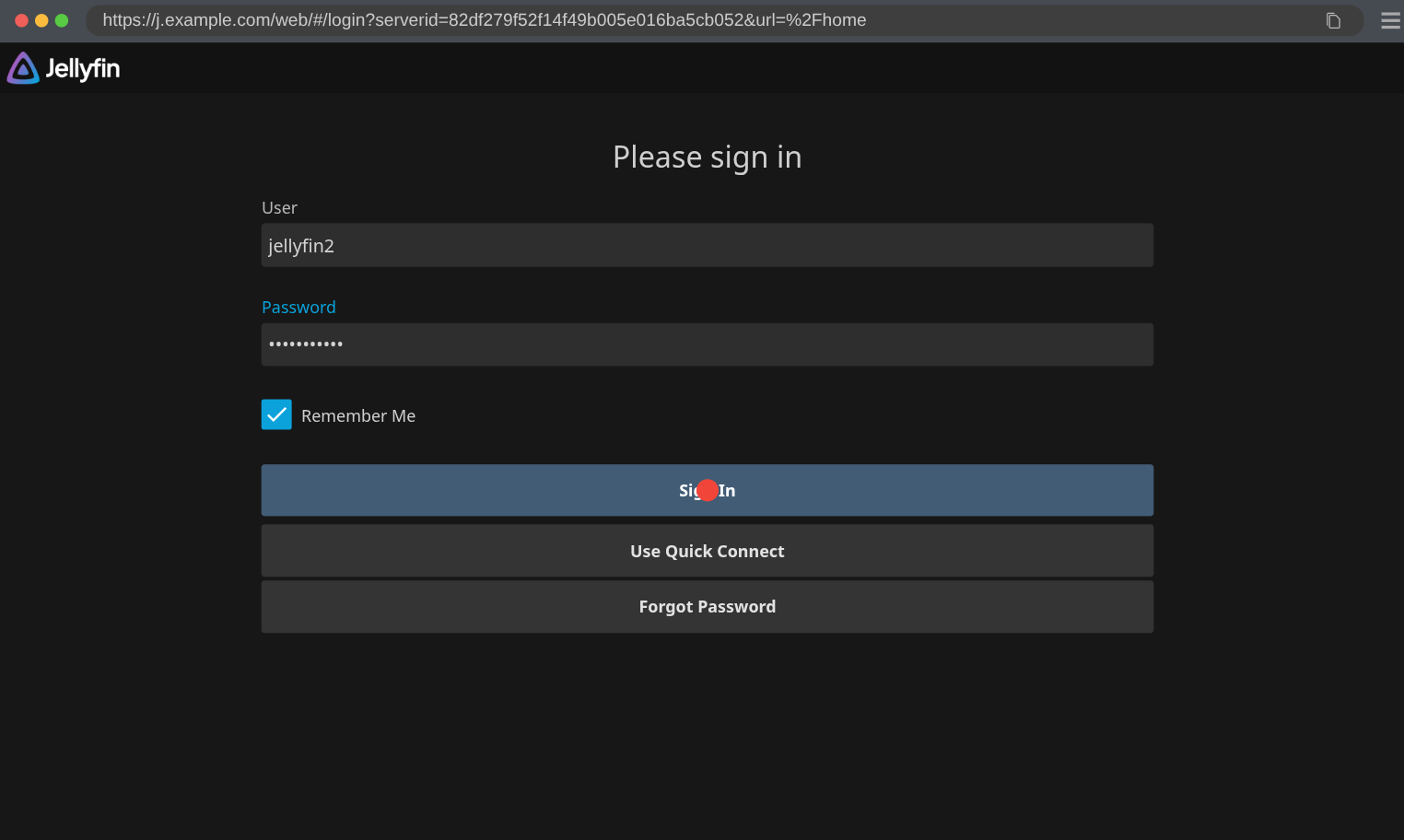
- We fill out the username and password.
- We click the Sign In button.
- We assert the user is logged in.
In code, a successful login looks like so:
def loginBasic(username, password):
  page.goto("https://jellyfin.example.com")
  page.get_by_label(re.compile('[Uu]ser')).fill(username)
  page.get_by_label(re.compile('[Pp]assword')).fill(password)
  page.get_by_role("button", name=re.compile('Sign In')).click()
  expect(page.get_by_text(re.compile('[Ii]nvalid'))).not_to_be_visible()
  expect(page.get_by_label(re.compile('^[Uu]ser'))).not_to_be_visible()
The expect combined with not_to_be_visible() is to make sure the popup saying the user could not log in has not shown up and that we’re not seeing the login form anymore.
And a bad login:
def loginBasicFail(username, password):
  page.goto("https://jellyfin.example.com")
  page.get_by_label(re.compile('[Uu]ser')).fill(username)
  page.get_by_label(re.compile('[Pp]assword')).fill(password)
  page.get_by_role("button", name=re.compile('Sign In')).click()
  expect(page.get_by_text(re.compile('[Ii]nvalid'))).to_be_visible()
  expect(page.get_by_label(re.compile('^[Uu]ser'))).to_be_visible()
Note that Jellyfin cannot create users declaratively so I’m only testing login with the admin user in that one. Having a declarative admin user is something I added myself too and upstreamed into Jellyfin.
The SSO integration has a different flow.
We first need to click on the SSO button
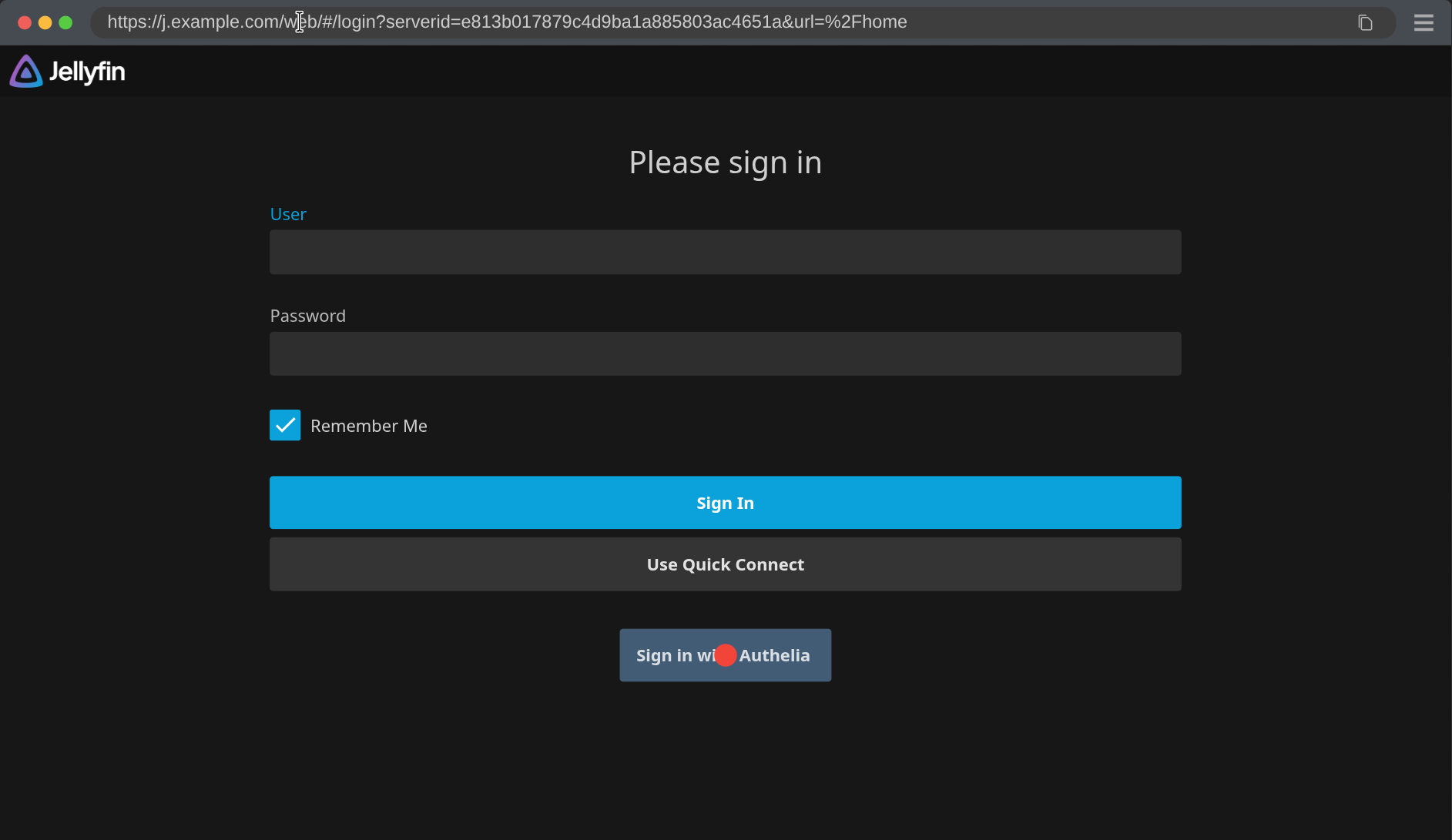
which redirects to the login flow.
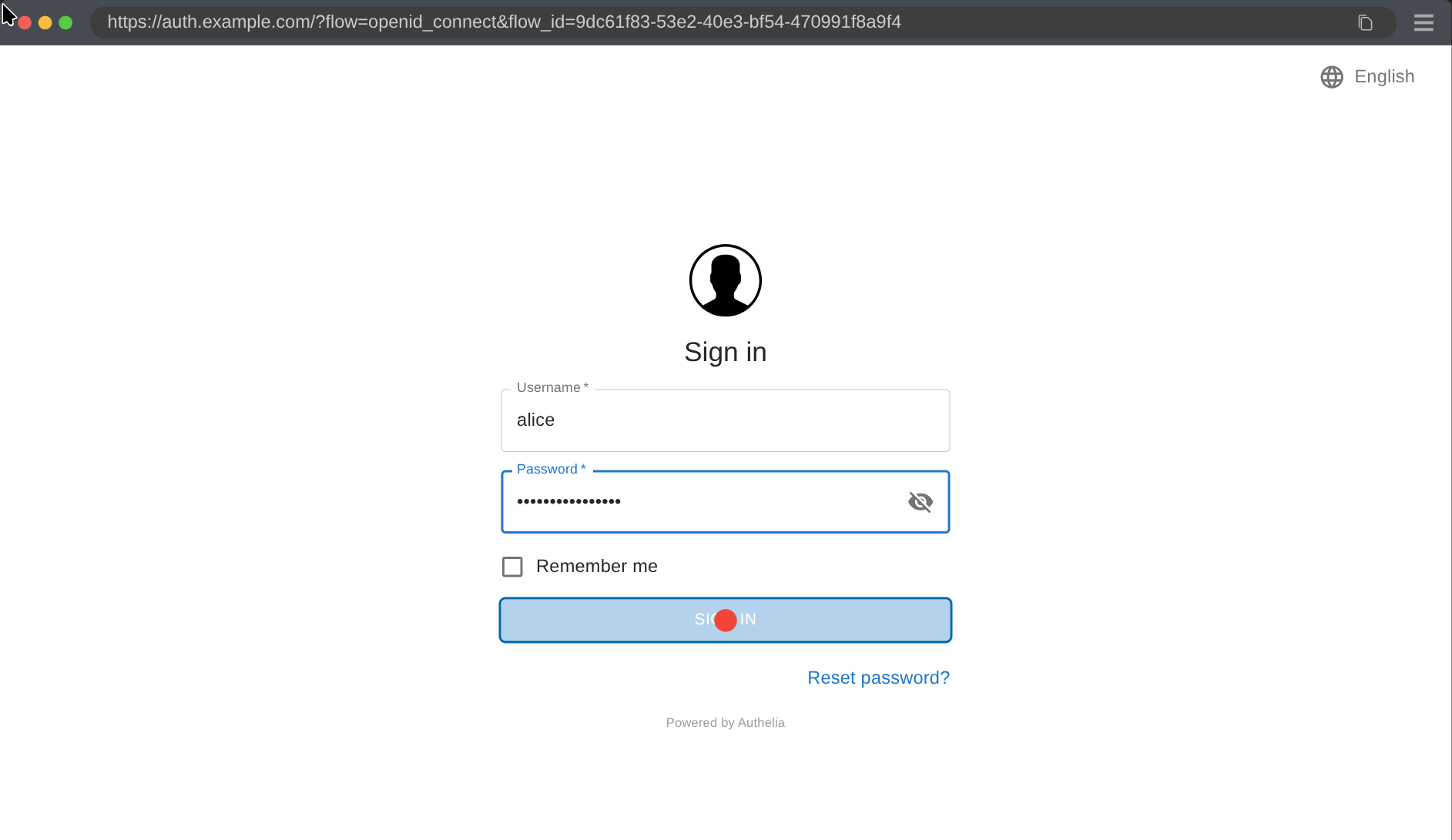
We then we have to grant access
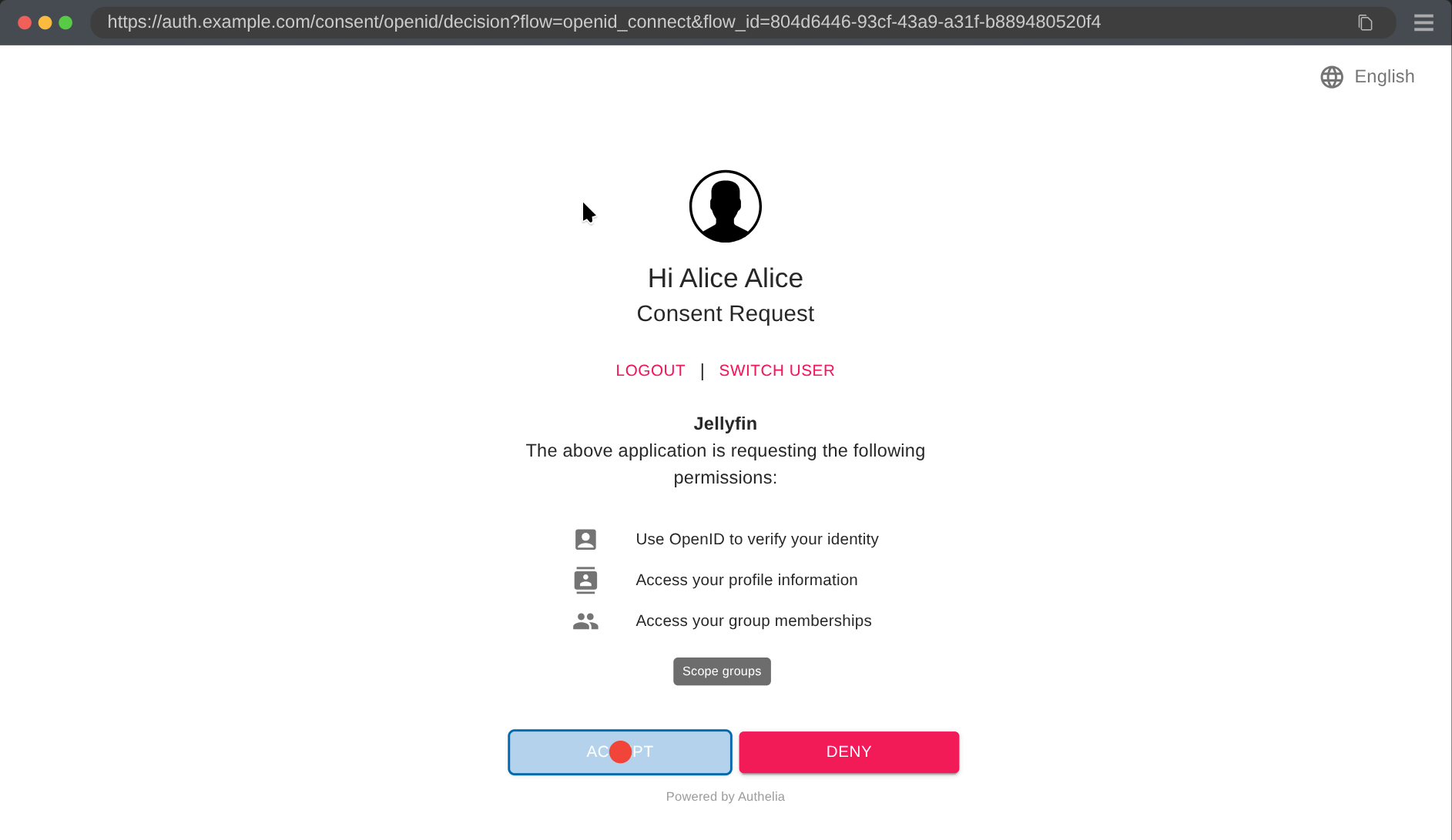
and then we can finally login.
Which in code looks like so:
def loginSSO(username, password):
  page.goto("https://jellyfin.example.com")
  with context.expect_page() as p:
    page.locator('text=Sign in with Authelia').click()
  page = p
  page.get_by_label('Username').fill(username)
  page.get_by_label('Password').fill(password)
  page.get_by_role("button", name=re.compile('Sign In')).click()
  page.get_by_text(re.compile('[Aa]ccept')).click()
  expect(page.get_by_text(re.compile('[Ii]nvalid'))).not_to_be_visible()
  expect(page.get_by_label(re.compile('^[Uu]ser'))).not_to_be_visible()
Although Jellyfin has an SSO plugin, it has no official way to show a “log in with SSO” button. To still show a button on the login page, we abuse the system designed to add your own branding to Jellyfin by adding the button there. Unfortunately that always opens the login page in a new tab, which we need to catch above with the context.expect_page() call.
Here, the fail login does not have the exact same flow. To avoid waiting for redirection, we navigate back to the Jellyfin base URL and make sure the login form shows up:
def loginSSOFail(username, password):
  page.goto("https://jellyfin.example.com")
  with context.expect_page() as p:
    page.locator('text=Sign in with Authelia').click()
  page = p
  page.get_by_label('Username').fill(username)
  page.get_by_label('Password').fill(password)
  page.get_by_role("button", name=re.compile('Sign In')).click()
  page.goto("https://jellyfin.example.com")
  expect(page.get_by_text(re.compile('[Ii]nvalid'))).to_be_visible()
  expect(page.get_by_label(re.compile('^[Uu]ser'))).to_be_visible()
Taking all this together, we can now complete the various testScripts:
# ...
{
  basic = pkgs.testers.runNixOSTest {
    name = "jellyfin_basic";
    nodes.server.imports = [ basicTestModule ];
    nodes.client.imports = [ clientLoginModule ];
    testScript = ''
      start_all()
      loginBasic("admin", config.shb.hardcodedsecret.jellyfinAdminPassword.settings.content)
      loginBasicFail("admin", "BadPassword")
    '';
  };

  ldap = pkgs.testers.runNixOSTest {
    name = "jellyfin_ldap";
    nodes.server.imports = [ ldapTestModule ];
    nodes.client.imports = [ clientLoginModule ];
    testScript = ''
      start_all()
      loginBasic("admin", config.shb.hardcodedsecret.jellyfinAdminPassword.settings.content)
      loginBasicFail("admin", "BadPassword")
      loginBasic("alice", config.shb.hardcodedsecret.alice.settings.content)
      loginBasicFail("alice", "BadPassword")
      loginBasic("bob", config.shb.hardcodedsecret.alice.settings.content)
      loginBasicFail("bob", "BadPassword")
      loginBasicFail("charlie", config.shb.hardcodedsecret.alice.settings.content)
      loginBasicFail("charlie", "BadPassword")
    '';
  };

  sso = pkgs.testers.runNixOSTest {
    name = "jellyfin_sso";
    nodes.server.imports = [ ssoTestModule ];
    nodes.client.imports = [ clientLoginModule ];
    testScript = ''
      start_all()
      loginSSO("alice", config.shb.hardcodedsecret.alice.settings.content)
      loginSSOFail("alice", "BadPassword")
      loginSSO("bob", config.shb.hardcodedsecret.alice.settings.content)
      loginSSOFail("bob", "BadPassword")
      loginSSOFail("charlie", config.shb.hardcodedsecret.alice.settings.content)
      loginSSOFail("charlie", "BadPassword")
    '';
  };
};
start_all() starts all VM nodes. In the SSO integration case, we don’t login with the admin user since it is not provisioned by the SSO integration. I aslo left out how to import the login* Python function for brevity.
The actual test framework is actually organised a bit differently to provide more reusable pieces and accommodate to the various particularities of the different services. You can take a look at the real jellyfin test file and the real common testing framework by clicking on the links.
Conclusion?
I know, the conclusion is not at the end of the blog post, but we did achieve our original goal now!
We can finally make sure no update will break our previous integrations with LDAP and SSO providers without us noticing.
But let’s continue a bit, we’re not totally done yet.
Debugging
Thanks to saving the traces, it’s easy to figure out what’s wrong. After running a test, you can see the traces with:
$ nix build .#checks.x86_64-linux.vm_jellyfin_https -L --keep-failed

$ ls -1 result/trace/
0.zip
1.zip
2.zip
3.zip

$ nix run github:ibizaman/selfhostblocks#playwright show-trace result/trace/0.zip
The --keep-failed is necessary to use if the test failed, because it will then print where the temp files are locate. In that case, you can access them with:
$ sudo cp -r /nix/var/nix/builds/nix-256919-1305278864/build trace && sudo chown -R $USER: trace

$ nix run github:ibizaman/selfhostblocks#playwright show-trace trace/shared-xchg/trace/0.zip
You then get this nice detailed view of everything that happened from the browser’s perspective.
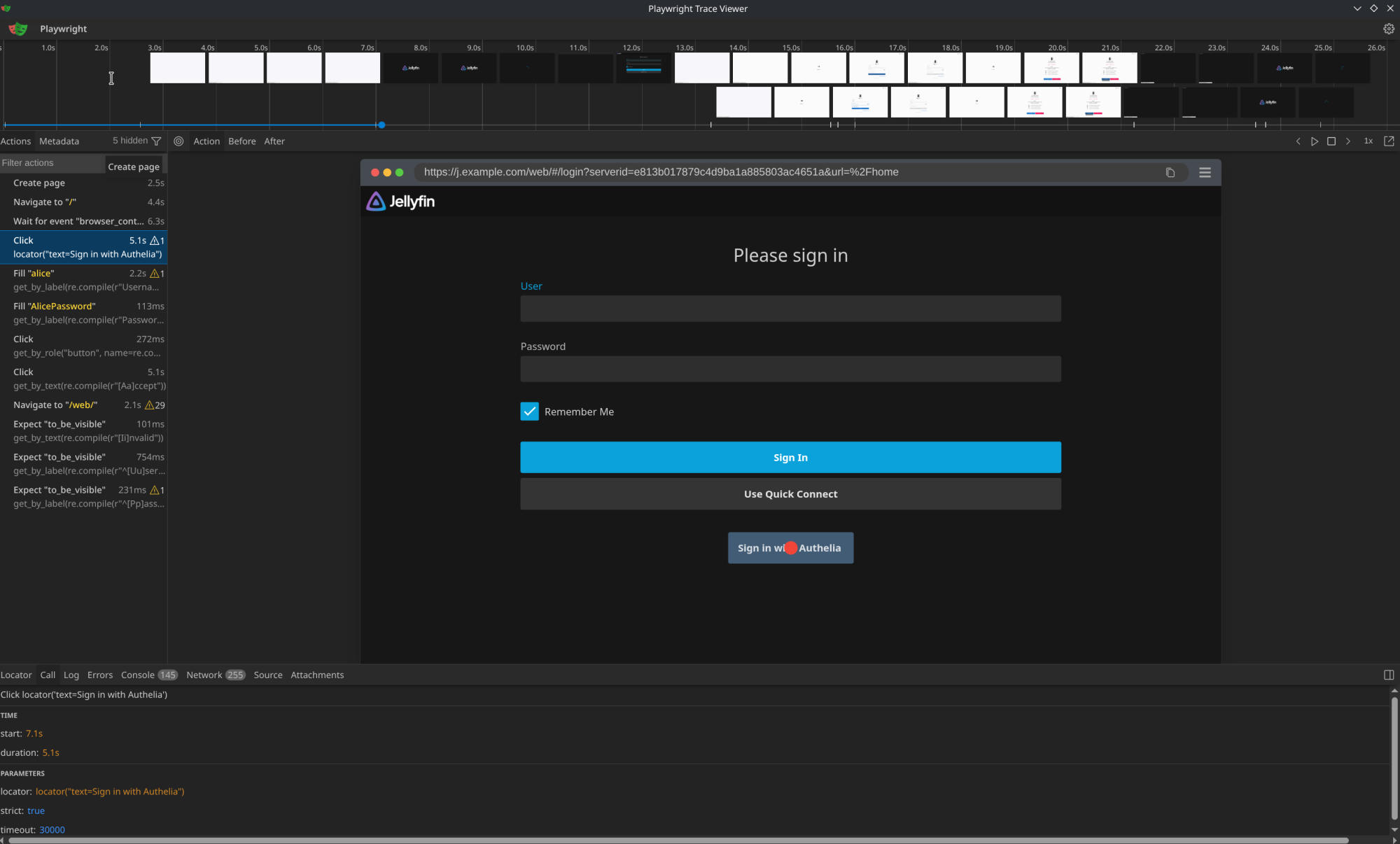
It’s usually best to start with this view and then look at the test logs, to at least narrow down where to look.
Bonus Test
But that’s not all folks. Something I noticed in the Nextcloud service is that one can correctly setup the LDAP and SSO integration but still make them inconsistent with each other. What I mean is if you set up both integrations and login once using the LDAP flow and once through the SSO flow, you might end up with two different users!
Now, how do you test something like this? Well, NixOS provides us with something quite unique, specializations. Think of those as parallel configurations for our NixOS host that we can switch between at runtime, without needing to deploy again.
So let’s create this final test:
# ...
{
  users = pkgs.testers.runNixOSTest {
    name = "jellyfin_users";

    nodes.server = {
      imports = [
        basicTestModule
      ];

      specialisation.ldap.configuration = {
        imports = [ ldapTestModule ];
      };

      specialisation.sso.configuration =
        { config, ... }:
        {
          imports = [ ssoTestModule ];

          # https://github.com/ibizaman/selfhostblocks/issues/843
          shb.jellyfin.admin.username = lib.mkForce "jellyfin2";
       };
    };

    nodes.client = {
      imports = [
        clientLoginModule
      ];
    };

    testScript =
      let
        specializationsServer = "${nodes.server.system.build.toplevel}/specialisation";
      in
      ''
        def switch_to_specialization(name):
            with subtest(f"switch specialization to {name}"):
                server.succeed(f'${specializationsServer}/{name}/bin/switch-to-configuration test')
                server.wait_for_unit("multi-user.target")

        start_all()
        server.wait_for_unit("multi-user.target")

        switch_to_specialization("ldap")

        # This sleep is needed because Jellyfin reports it is ready before it truly is ready.
        # See ticket https://github.com/ibizaman/selfhostblocks/issues/842
        print("sleeping 60 seconds...")
        import time
        time.sleep(60)

        with subtest("find alice"):
            users = json.loads(server.succeed("sqlite3 /var/lib/jellyfin/data/jellyfin.db -json 'SELECT * FROM Users;'"))
            aliceUsers = [u for u in users if u["Username"] == "alice"]
            if len(aliceUsers) != 1:
                raise Exception(f"Unexpected number of users for alice, got {len(aliceUsers)}\n{json.dumps(users, indent=4)}")
            alice = aliceUsers[0]
            print(f"Users: \n{json.dumps(users, indent=4)}")
            if alice["AuthenticationProviderId"] != "Jellyfin.Plugin.LDAP_Auth.LdapAuthenticationProviderPlugin":
                raise Exception("Unexpected authentication provider id, got {alice['AuthenticationProviderId']}")
            if alice["PasswordResetProviderId"] != "Jellyfin.Plugin.LDAP_Auth.LdapAuthenticationProviderPlugin":
                raise Exception("Unexpected password resiet provider id, got {alice['PasswordResetProviderId']}")

        switch_to_specialization("sso")
        time.sleep(60)

        with subtest("find alice"):
            users = json.loads(server.succeed("sqlite3 /var/lib/jellyfin/data/jellyfin.db -json 'SELECT * FROM Users;'"))
            aliceUsers = [u for u in users if u["Username"] == "alice"]
            if len(aliceUsers) != 1:
                raise Exception(f"Unexpected number of users for alice, got {len(aliceUsers)}\n{json.dumps(users, indent=4)}")
            alice = aliceUsers[0]
            print(f"Users: \n{json.dumps(users, indent=4)}")
            if alice["AuthenticationProviderId"] != "Jellyfin.Plugin.LDAP_Auth.LdapAuthenticationProviderPlugin":
                raise Exception("Unexpected authentication provider id, got {alice['AuthenticationProviderId']}")
            if alice["PasswordResetProviderId"] != "Jellyfin.Plugin.LDAP_Auth.LdapAuthenticationProviderPlugin":
                raise Exception("Unexpected password resiet provider id, got {alice['PasswordResetProviderId']}")
      '';
  };
}
The meat of the test is the if clause len(aliceUsers) != 1. This makes sure only one alice is ever found in the database. There are some extra checks to make sure Alice was created with the LDAP provider but those are maybe superfluous, we’ll see in the long run.
In the test, we create 2 specializations. One for LDAP integration and one for SSO. We switch from one to the other mid test. So on top of making sure only one use is created, we make sure changing the configuration works fine too.
You’ll also notice comments linking to issues 842 and 843. Those are quirks of Jellyfin I needed to circumvent. One day I’ll get back and fix them.
Conclusion
We’re really at the end here. If you followed along, well, thanks! It was a long and frustrated journey to get this result but I don’t regret it. I like those tests and plan to cover more services.
Feel free to check the repo or join the Matrix chat to talk about it.
Want to comment on this blog post? Head to the discourse post.