I must admit I never understood the purpose of buildFHSEnv…
Until I bumped into the issue that it solved!
I’m writing this blog post so you’re aware buildFHSEnv exists
and hopefully you’ll think of it if you need it.
Comments can be found in the discourse post.
Context
I wanted to flash espcontrol on a touchscreen / display frame I just bought.
The display is a seeed reTerminal D1001, an 8 inch touchscreen ESP32-P4 based board with a ton of features like dual microphones, a speaker, a camera and wifi using an ESP32-C6. Perfect for a home control dashboard.
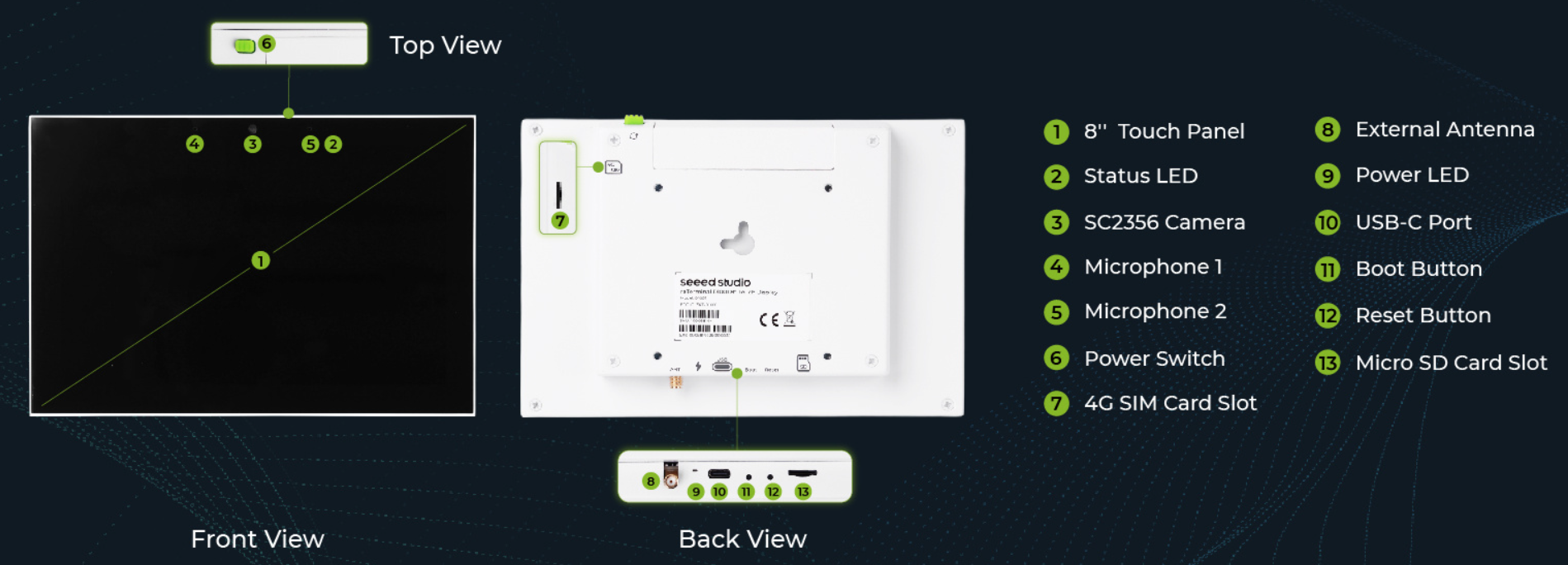
I found a wall mount for it which is printing as I’m writing this blog post.

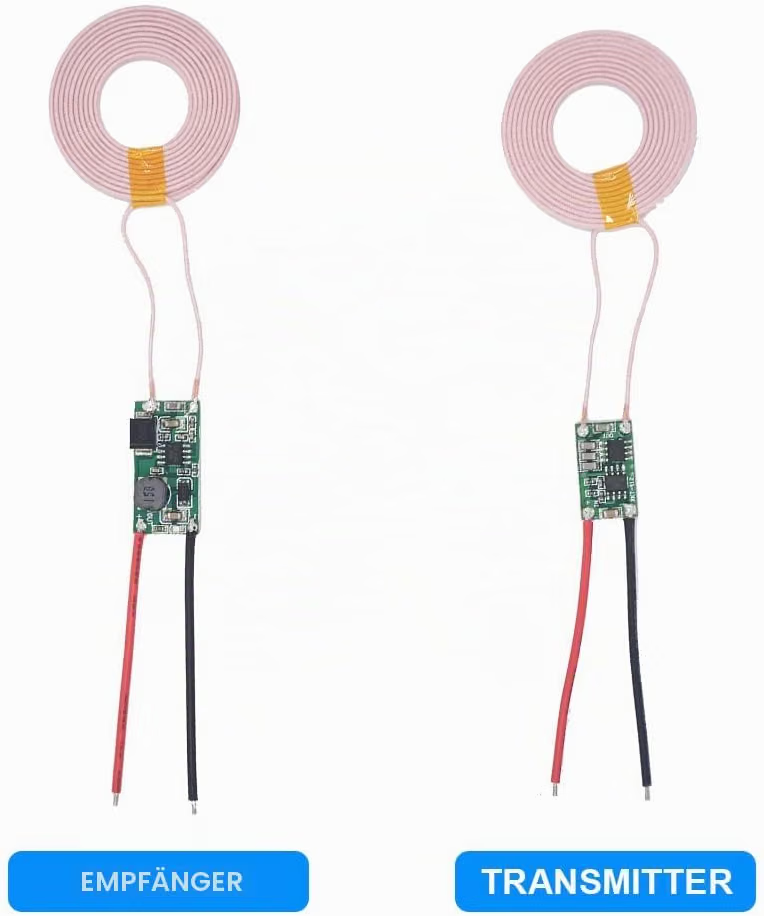
One modification I’ll be adding is inductive charging. As you can see, the wall mount is nice because it is removable. But there’s still the USB-C cable to connect which makes it clunky.

I found a cheap inductive charger with mixed reviews. We’ll see how it behaves when it’s delivered.
The problem
Uh, but I digress… back to buildFHSEnv.
Espcontrol does not support this device out of the box, so I used the community repo espcontrol-community-devices instead.
They do not provide a chromium based USB install, which anyway never worked for me,
so I put up a little file to use their repo and build the firmware myself with esphome:
# seeedD1001.yaml

substitutions:
  name: "seeedd1001screen"
  friendly_name: "Home Assistant Controller"

wifi:
  ssid: !secret wifi_ssid
  password: !secret wifi_pwd

packages:
  setup:
    url: https://github.com/lamiskin/espcontrol-community-devices/
    ref: community-v0.7.1-upstream.v2.8.5
    file: devices/seeed-esp32-p4-reterminal-d1001/packages.yaml
If you’re wondering, the secrets come from the following file:
# secrets.yaml

<<: !include /home/ME/.esphome/secrets.yaml
Which makes it possible to store secrets out of the repo. It’s clever but I’d rather have it pull the secrets from bitwarden instead of needing to store them in plaintext. Anyway, that’s a project for later.
Now, I need a flake.nix so I can get esphome:
# flake.nix

{
  description = "ESP flake";

  inputs = {
    nixpkgs.url = "github:NixOS/nixpkgs/nixos-unstable";
  };

  outputs =
    { nixpkgs, ... }:
    let
      pkgs = import nixpkgs { system = "x86_64-linux"; };
    in
    {
      devShell.x86_64-linux = pkgs.mkShell {
        packages = with pkgs; [
          esphome
          esptool
          libusb1
        ];
      };
    };
}
You’ll see I preemptively installed libusb1 otherwise we’d be greeted with the following error message:
ERROR libusb-1.0.so.0 was not found on this system.Now, let’s open the shell and compile the code:
$ nix develop
$ esphome compile seeedD1001.yaml
INFO ESPHome 2026.8.0
INFO Reading configuration seeedD1001.yaml...
...
INFO Checking ESP-IDF 5.5.5 framework ...
INFO Installing ESP-IDF 5.5.5 framework ...
INFO Downloading cmake@3.30.2 (1/4) ...
Downloading: [============================================================] 100% Done...
INFO Downloading ninja@1.12.1 (2/4) ...
Downloading: [============================================================] 100% Done...
INFO Downloading xtensa-esp-elf@esp-14.2.0_20260121 (3/4) ...
Downloading: [============================================================] 100% Done...
INFO Downloading riscv32-esp-elf@esp-14.2.0_20260121 (4/4) ...
Downloading: [============================================================] 100% Done...
Selected targets are: esp32, esp32p4
Current system platform: linux-amd64
Installing tools: cmake, ninja, xtensa-esp-elf, riscv32-esp-elf, esp-rom-elfs
Installing cmake@3.30.2
file cmake-3.30.2-linux-x86_64.tar.gz is already downloaded
Extracting .cache/esphome/idf/dist/cmake-3.30.2-linux-x86_64.tar.gz to .cache/esphome/idf/tools/cmake/3.30.2
ERROR: tool cmake version 3.30.2 is installed, but getting error: non-zero exit code (127) with message: Could not start dynamically linked executable: .cache/esphome/idf/tools/cmake/3.30.2/bin/cmake
NixOS cannot run dynamically linked executables intended for generic
linux environments out of the box. For more information, see:
https://nix.dev/permalink/stub-ld

ERROR: Failed to check the tool while installed. Removing directory .cache/esphome/idf/tools/cmake/3.30.2
ERROR ESP-IDF 5.5.5 framework installation - failed (returncode=1)
Let me copy and format the error:
ERROR: tool cmake version 3.30.2 is installed,
but getting error: non-zero exit code
(127) with message: Could not start dynamically
linked executable:
.cache/esphome/idf/tools/cmake/3.30.2/bin/cmake

NixOS cannot run dynamically linked executables
intended for generic linux environments out of the box.
For more information, see:
https://nix.dev/permalink/stub-ld
So you see, here the issue is with a dynamically linked executable.
My first guess will all things nix related was to add the
cmake and ninja executables to the shell.
If they’re provided by nix, the compilation should work, right?
Well, the error we get is actually no different
although it sees the installed cmake and ninja:
ERROR: tool riscv32-esp-elf has no installed versions.
The environment indicates that you might be using NixOS.
Please see https://nixos.wiki/wiki/ESP-IDF
for how to install tools for it.

ERROR: tool cmake version 3.30.2 is installed,
but cannot be run: non-zero exit code (127)
with message:
Could not start dynamically linked executable:
.cache/esphome/idf/tools/cmake/3.30.2/bin/cmake
NixOS cannot run dynamically linked executables
intended for generic linux environments out of the box.
For more information, see:
https://nix.dev/permalink/stub-ld

ERROR: tool ninja version 1.12.1 is installed,
but cannot be run: non-zero exit code (127)
with message:
Could not start dynamically linked executable:
.cache/esphome/idf/tools/ninja/1.12.1/ninja
NixOS cannot run dynamically linked executables
intended for generic linux environments out of the box.
For more information, see:
https://nix.dev/permalink/stub-ld
https://nix.dev/permalink/stub-ld
gives some useful tips but it does not talk about buildFHSEnv
which I find nicer to use in this context.
https://wiki.nixos.org/wiki/ESP-IDF is also a nice guide although it looks quite low-level. Also, there’s a warning so I didn’t venture into that:
Warning: As of ESP-IDF v5.0, the following guide does not work properly and results in errors. Any contributions toward a fix would be appreciated.
There is also nixpkgs-esp-dev which should help solve this but I didn’t try it because I was not aware it existed before publishing this blog post! See this discourse comment.
The fix
We can modify our flake.nix so it gives us an environment
that accept dynamically linked executables:
{
  description = "ESP flake";

  inputs = {
    nixpkgs.url = "github:NixOS/nixpkgs/nixos-unstable";
  };

  outputs =
    { nixpkgs, ... }:
    let
      pkgs = import nixpkgs { system = "x86_64-linux"; };

      fhs = pkgs.buildFHSEnv {
        name = "esphome-fhs";

        targetPkgs =
          pkgs: with pkgs; [
            esphome
            esptool

            cmake
            ninja
            libusb1
          ];

        runScript = "bash";
      };
    in
    {
      devShells.x86_64-linux.default = pkgs.mkShell {
        packages = [
          fhs
        ];

        shellHook = ''
          echo "Run: esphome-fhs"
        '';
      };
    };
}
Now, let’s try compiling again.
We must not forget to start the FHS environment
by calling the esphome-fhs script.
$ nix develop
Run: esphome-fhs

$ type esphome
bash: type: esphome: not found

$ esphome-fhs

$ type esphome
esphome is /usr/bin/esphome

$ esphome compile seeedD1001.yaml
Funny, right? Seeing /usr/bin in NixOS feels weird.
I’ll spare you the long output but this actually compiles. I promise!
Conclusion
Now that I compiled the project, I found some issues which were reported upstream and promptly fixed. So if you ever buy the same display as me, you’ll be good to go.
Want to discuss about this? Head to the discourse post.
And that’s all folks.
Bonus
If you’re curious like me, you’re wondering what magic
lies behind this esphome-fhs script. Let’s check together!
I’m including the whole script below, to avoid you needing to find it yourself, but it’s a long read so I’ll put my two comments here already.
The executable comes from here and are all symlinked in the first for loop:
$ ls /nix/store/bhap1micriwsifin0fzc55zf6g24yy88-esphome-fhs-fhsenv-rootfs/
bin  etc  lib  lib32  lib64  libexec  nix-support  sbin  usr

$ ls -l /nix/store/bhap1micriwsifin0fzc55zf6g24yy88-esphome-fhs-fhsenv-rootfs/usr/bin/esphome
lrwxrwxrwx 3 nobody nogroup 72 Jan  1  1970
/nix/store/bhap1micriwsifin0fzc55zf6g24yy88-esphome-fhs-fhsenv-rootfs/usr/bin/esphome
-> /nix/store/x88b62sgc4fvq9dyj2w8sp10pf64n1jj-esphome-2026.8.2/bin/esphome
Nothing much interesting in the init script:
$ cat /nix/store/b2j76ql82nsi8yynwjb88lk0l69p71r3-esphome-fhs-init
#!/nix/store/9ipfvwnqp1q8ijnmi5sxvlx9r8w34lw3-bash-5.3p15/bin/bash
source /etc/profile
exec bash "$@"
#!/nix/store/9ipfvwnqp1q8ijnmi5sxvlx9r8w34lw3-bash-5.3p15/bin/bash
ignored=(/nix /dev /proc /etc )
ro_mounts=()
symlinks=()
etc_ignored=()
# loop through all entries of root in the fhs environment, except its /etc.
for i in /nix/store/bhap1micriwsifin0fzc55zf6g24yy88-esphome-fhs-fhsenv-rootfs/*; do
path="/${i##*/}"
if [[ $path == '/etc' ]]; then
:
elif [[ -L $i ]]; then
symlinks+=(--symlink "$(/nix/store/3qgy8q2j64v2m9jy3a5jmssacbblhd4r-coreutils-9.11/bin/readlink "$i")" "$path")
ignored+=("$path")
else
ro_mounts+=(--ro-bind "$i" "$path")
ignored+=("$path")
fi
done
# loop through the entries of /etc in the fhs environment.
if [[ -d /nix/store/bhap1micriwsifin0fzc55zf6g24yy88-esphome-fhs-fhsenv-rootfs/etc ]]; then
for i in /nix/store/bhap1micriwsifin0fzc55zf6g24yy88-esphome-fhs-fhsenv-rootfs/etc/*; do
path="/${i##*/}"
# NOTE: we're binding /etc/fonts and /etc/ssl/certs from the host so we
# don't want to override it with a path from the FHS environment.
if [[ $path == '/fonts' || $path == '/ssl' ]]; then
continue
fi
if [[ -L $i ]]; then
symlinks+=(--symlink "$i" "/etc$path")
else
ro_mounts+=(--ro-bind "$i" "/etc$path")
fi
etc_ignored+=("/etc$path")
done
fi
# propagate /etc from the actual host if nested
if [[ -e /.host-etc ]]; then
ro_mounts+=(--ro-bind /.host-etc /.host-etc)
else
ro_mounts+=(--ro-bind /etc /.host-etc)
fi
declare -A etc_ignored_set
for ign in "${etc_ignored[@]}"; do
etc_ignored_set[$ign]=1
done
# link selected etc entries from the actual root
for i in /etc/static /etc/nix /etc/shells /etc/bashrc /etc/zshenv /etc/zshrc /etc/zinputrc /etc/zprofile /etc/passwd /etc/group /etc/shadow /etc/hosts /etc/resolv.conf /etc/nsswitch.conf /etc/profiles /etc/login.defs /etc/sudoers /etc/sudoers.d /etc/localtime /etc/zoneinfo /etc/machine-id /etc/os-release /etc/pam.d /etc/fonts /etc/alsa /etc/asound.conf /etc/ssl/certs /etc/ca-certificates /etc/pki /etc/dconf; do
if [[ -n "${etc_ignored_set[$i]:-}" ]]; then
continue
fi
if [[ -e $i ]]; then
symlinks+=(--symlink "/.host-etc/${i#/etc/}" "$i")
fi
done
declare -A ignored_set
for ign in "${ignored[@]}"; do
ignored_set[$ign]=1
done
declare -a auto_mounts
# loop through all directories in the root
for dir in /*; do
# if it is a directory and not already provided by the FHS env or
# explicitly ignored, bind-mount it into the chroot. Use exact match
# via associative array because regex substring matching incorrectly
# skips prefixes (e.g. /sb would match /sbin and never get mounted,
# breaking --chdir when CWD is on a custom mount like /sb/project).
# https://github.com/NixOS/nixpkgs/issues/241151
if [[ -d "$dir" ]] && [[ -z "${ignored_set[$dir]:-}" ]]; then
# add it to the mount list
auto_mounts+=(--bind "$dir" "$dir")
fi
done
declare -a x11_args
# Always mount a tmpfs on /tmp/.X11-unix
# Rationale: https://github.com/flatpak/flatpak/blob/be2de97e862e5ca223da40a895e54e7bf24dbfb9/common/flatpak-run.c#L277
x11_args+=(--tmpfs /tmp/.X11-unix)
# Try to guess X socket path. This doesn't cover _everything_, but it covers some things.
if [[ "$DISPLAY" == *:* ]]; then
# recover display number from $DISPLAY formatted [host]:num[.screen]
display_nr=${DISPLAY/#*:} # strip host
display_nr=${display_nr/%.*} # strip screen
local_socket=/tmp/.X11-unix/X$display_nr
x11_args+=(--ro-bind-try "$local_socket" "$local_socket")
fi
cmd=(
/nix/store/v24sx9l1jmvvia3z8iznrd7jwhvc8kcf-bubblewrap-0.11.2/bin/bwrap
--dev-bind /dev /dev
--proc /proc
--chdir "$(pwd)"
--die-with-parent
--bind /nix /nix
# Our glibc will look for the cache in its own path in `/nix/store`.
# As such, we need a cache to exist there, because pressure-vessel
# depends on the existence of an ld cache. However, adding one
# globally proved to be a bad idea (see #100655), the solution we
# settled on being mounting one via bwrap.
# Also, the cache needs to go to both 32 and 64 bit glibcs, for games
# of both architectures to work.
--tmpfs /nix/store/n51dhmdbik1kfrsm62j5knavmigwrl1a-glibc-2.42-84/etc \
--tmpfs /etc \
--symlink /etc/ld.so.conf /nix/store/n51dhmdbik1kfrsm62j5knavmigwrl1a-glibc-2.42-84/etc/ld.so.conf \
--symlink /etc/ld.so.cache /nix/store/n51dhmdbik1kfrsm62j5knavmigwrl1a-glibc-2.42-84/etc/ld.so.cache \
--ro-bind /nix/store/n51dhmdbik1kfrsm62j5knavmigwrl1a-glibc-2.42-84/etc/rpc /nix/store/n51dhmdbik1kfrsm62j5knavmigwrl1a-glibc-2.42-84/etc/rpc \
--remount-ro /nix/store/n51dhmdbik1kfrsm62j5knavmigwrl1a-glibc-2.42-84/etc \
--symlink /nix/store/b2j76ql82nsi8yynwjb88lk0l69p71r3-esphome-fhs-init /init \
"${ro_mounts[@]}"
"${symlinks[@]}"
"${auto_mounts[@]}"
"${x11_args[@]}"
/nix/store/2adjgb1kksmfjph5v9lr1774zpdlaly9-container-init "$@"
)
exec "${cmd[@]}"